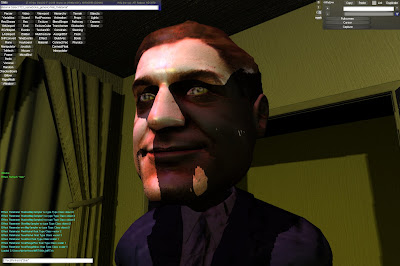
IBL


implementation of IBL from  http://www.inemeri.com/blog
http://timothylottes.blogspot.com/2011/04/inemeri-ibl-tube.html

nice, some popping artefacts occur when close camera shots of the head ... probably doing something wrong with depth .... but for geometry it looks really nice !!

Anti Aliasing

I tried the FSAA from http://timothylottes.blogspot.com/ .. looks nice !

FSAA 1x

NoAA

FSAA 2x


 Edge Detect smoothing of edges
and FSAA 2x

Can't Compile Content Exporter with new FBXSDK 2011.3 ?

due to changes in recent FBX sdk, change:
 Line 170: 
    //DOUBLE* pColorRGB = (DOUBLE*)pFbxLight->Color.Get();
    fbxsdk_2011_3::fbxDouble3 pColorRGB = pFbxLight->Color.Get();

so ParseMesh.cpp in ImportFBX line 182 should be:
     KFbxMesh::EMeshSmoothness Smoothness = pFbxMesh->GetMeshSmoothness();
    if( Smoothness != KFbxMesh::eHULL && g_pScene->Settings().bConvertMeshesToSubD )

Line 222, FBXImportMain.cpp:
    //KFbxIO::GetCurrentVersion( iMajorVersion, iMinorVersion, iRevision );
    g_pSDKManager->GetFileFormatVersion(iMajorVersion, iMinorVersion, iRevision );
   
Line  240, FBXImportMain.cpp:
    //g_pImporter->SetFileFormat( iFileFormat ); // GetFileFormatVersion
    BOOL bResult = g_pImporter->Initialize( strFileName, iFileFormat );

just a thing or two


HDR, Ghosting on Smudgy Glass Lens, Streak, Glare, Disc Depth of field, Heat & Haze, Tesselation, Bump  Edge anti-aliasing, phonemes recognition. All running on ATI Radeon 5870 at 1920x1200 at 60Hz.

Naive Volumetric Rendering


Below are screens from my deferred volumetric renderer, an attempt to render participating media or participating media renderer attempt.

It uses a simple approach for rendering volumetric fog as described in Boyd's Volumetric Rendering in Realtime at http://www.gamasutra.com/features/20011003/boyd_01.htm
or Nvidia's Fog Polygon volumes. Technique is similar to one described by Wyman And Rames in ShaderX 7 "A hybrid Method for Interactive Shadows in Homogeneous Media".
Yet it does not use any shadow volumes.
It uses naive ray marching method, but does sampling only inside desired volume.
It can render light shaft and shadow streaks in a volume as well as coloured light sources.
It does introduce aliasing and undersampling artifacts, if volume is too large.
It's uses a per pixel volume marching, but I was suprised with the results. A volume can also use a gobo as a color modifier.
Idea is simple, given world position (from deferred pass)
render as deferred light but: (in 1/4 resolution)
1. backDepth pass:
render depth of backfaces of a volume in different render target (backDepth)
(Cull CW, disable ZWrite, enable ZEnable, ZFunc always, depthStencil from deferred pass)
compare Z (depth) with Z from scene depth
if sceneDepth.z less then backDepth.z then backdepth =sceneDepth

2. frontDepth pass:
render front faces,
(Cull CCW, enable ZWrite, enable ZWrite, ZFunc lessEqual, depthStencil from deferred pass)
vector4 midPos = frontDepth - backDepth;
vector4 pointInVolume
vector4 vLightPosInFog

for(int i = 0; i less num_samples;i++)
{
pointInVolume = frontDepth - (mid_pos)*len; // traverse from backDepth to frontDepth
vLightPosInFog = transform pInVolume.xyz with matViewToLightProj; // project to light space
// inShade = tex2Dproj(ShadowMapSampler, vLightPosFrontFog).r;
// if inShade less than vLightPosInFog.z then isInShadow
if IsInShadow(pointInVolume) then shade_fog++;
}
shade_fog = shade_fog*inv_num_samples; // shadow streaks
Were len is a distance from 0.0 to 1.0;
You can either do evenly distributed sampling or jittered sampling for len.
Do the same but sample gobo texture, wihout comparison, just add texture color.
Performance on ATI Radeon 4870 is ~60 FPS.


SSDO

Right now i am banging my head with Approximating Dynamic Global Illumination in Image Space.

Explicitly parallelize additions !

remember that
float a = b+c+d+e;
can be parallelized with:
float a = dot(float4(b,c,d,e,), 1.0f);
in shaders.

Shadow comparison

Raw tex2D(ShadowMap, ShadowTexCoord)

Blured version of tex2D(ShadowMap, ShadowTexCoord)


PCSS

Blurred version of PCSS


notice more even distribution of shadows on a cheek, under nose, and over eyes.


Soft shadow support


I have added PCSS support to my software.
You can see results on the image.
Performance is not bad neither.

3 Spotligths 16 samples blocker search, 16 samples PCF.

It took me a day to tweek everything, so that now it is more or less error prone (i hope).
Some links:
http://developer.download.nvidia.com/whitepapers/2008/PCSS_Integration.pdf

So whats new now


Recently i have been adding some new features to software. I am really disappointed, cause content producing guys do not use all the possibilites of the software. So i added some functionality that is completly transparent to use, ie. automatic. Above are some scenes from last season, i set the materials, No characters this time ! Scenes use glow and depth of field but no SSAO.


the old skul tip & trick

sin cos table old skul

back to the 32bit roots ?

Profiler in VS2005 on 64-bit OS is not working !?
Nor is profiling in VS2008 working on wow64. Damn.

As always, shadows on my mind... poor man's VSM mapping

Pros: Quite fast with soft edge (non-realistic) shadows

Cons: Edge bleeding

Should do Poisson filtering with depth difference when blurring, to avoid it !
The main idea is really simple:
1.We render depth buffer since we need it for SSAO.
2.We render a shadow calculation pass. to get shadow contributions to the scene. Shadow map resolutions can be low, standard problems with insufficient sampling will occur anyhow. Try something like PSM or similar.

3. So now you have black and white image with shadows only (notice poor resolution of shadow maps on the far wall): 4. A SSAO full resolution pass


Modulate SSAO and full screen shadow map pass , downsample 4x, blur horizontally and verticaly two times and upsample back to screen resolution .

Final result: lightning with modulated shadowing from 2 spot lights and combined SSAO pass. Notice smooth shadows of the far wall.
Edge detect using shadow contribution pass and SSAO post process, could be used to do different blurs depending on depth change.
Cheers,
Tex


... some more


at the end of the day, some more SSAO.

darkness is comming...

this SSAO thing, I kinda like it ;)
Post process passes: SSAO->DownSample->BlurH->BlurV->UpSample->Overlay
Depth Texture size: 256x256, Normal Texture size: 1024
Normal texture size should be bigger to avoid artifacts.


BUT... the more i look at it, the more creases bother me. So its acctualy "Ambient Occlusive Crease Shading". This paper is more interesting.

SSAO

Image space ambient occlusion or Screen space ambient occlusion, based on http://www.shalinor.com/code.html and http://rgba.scenesp.org/iq/computer/articles/ssao/ssao.htm

gpgpu forums

code for copy paste ... but more instructions...maybe change g_cKernelSize to 8 or 12...


//-----------------------------------------------------------------------------
// File: PP_SSAO.fx
//
// Desc: Effect file for image post-processing sample. This effect contains
// a single technique with a pixel shader that calculates simple SSAO
// uses full screen depth and normals
//-----------------------------------------------------------------------------
texture Albedo; // Here are normals
texture NormalMap; // Here is depth
//--------------------------------------------------------------------------------------
// Texture samplers
//--------------------------------------------------------------------------------------
sampler AlbedoSampler = sampler_state {
Texture = (Albedo);
MipFilter = LINEAR;
MinFilter = LINEAR;
MagFilter = LINEAR;
ADDRESSU = WRAP;
ADDRESSV = WRAP;
};
sampler NormalMapSampler = sampler_state {
Texture = (NormalMap);
MipFilter = NONE;
MinFilter = LINEAR;
MagFilter = LINEAR;
ADDRESSU = WRAP;
ADDRESSV = WRAP;
};

static const int g_cKernelSize = 24;
float2 PixelKernel[g_cKernelSize ] = {
{-0.326212f, -0.405805f},
{-0.840144f, -0.07358f},
{-0.695914f, 0.457137f},
{-0.203345f, 0.620716f},
{ 0.96234f, -0.194983f},
{ 0.473434f, -0.480026f},
{-0.519456f, 0.767022f},
{ 0.185461f, -0.893124f},
{ 0.507431f, 0.064425f},
{ 0.89642f, 0.412458f},
{-0.32194f, -0.932615f},
{-0.791559f, -0.597705f},
{ 0.326212f, -0.405805f},
{ 0.840144f, -0.07358f},
{ 0.695914f, 0.457137f},
{ 0.203345f, 0.620716f},
{-0.96234f, -0.194983f},
{-0.473434f, -0.480026f},
{ 0.519456f, 0.767022f},
{-0.185461f, -0.893124f},
{-0.507431f, 0.064425f},
{-0.89642f, 0.412458f},
{ 0.32194f, -0.932615f},
{ 0.791559f, -0.597705f}
};


float2 TexelKernel[g_cKernelSize]
< convertpixelstotexels512 = "PixelKernel">;


//float3 Settings (AOCreaseValues - Range, Bias, Averager, Unused)
float4 Settings = { 0.4196,-0.2510,4.8471,3.0627 };
float4 SettingsB = { 25.8824,1.0000,1.0000,1.0000 };

float4 PostProcessPS( float2 Tex : TEXCOORD0 ) : COLOR0
{
// Get center sample
float UVlr = 1/256;
float2 centeredUV = Tex;
float3 centerPos = tex2D(AlbedoSampler, centeredUV).xyz; // normals
float3 centerNormal = tex2D(NormalMapSampler, centeredUV).xyz; // depth
float4 totalGI = 1.0f;
float GI = 0.0f;

// Run through all taps
for (int i = 0; i < sampleuv =" centeredUV" samplepos =" tex2D(AlbedoSampler," tocenter =" samplePos" distance =" length(toCenter);" centercontrib =" saturate((dot(toCenter,centerNormal)" rangeattenuation =" 1-saturate(distance" totalgi =" float4(GI,GI,GI,1.0f);" vertexshader =" null;" pixelshader =" compile" zenable =" false;">